


Cybersecurity expert shares online safety tips
Cybersecurity expert Donavan Pillay shares advice on how to protect ourselves against online threats.

October is Cybersecurity Awareness Month, dedicated to raising awareness about the importance of cybersecurity and encouraging online users to practice safe online behaviours.
In an effort to keep you informed with the most up-to-date cybersecurity awareness tips, we spoke to cybersecurity specialist Donavan Pillay from Matnet Technologies.
Pillay has a wealth of knowledge and experience, having not only learned about cybersecurity behaviours in South Africa but also gained global insights.
The world of cybersecurity is vast and concentrated.
Read more: Expert: SARS eFiling hijackings linked to public Wi-Fi
We asked Pillay to break down the most common areas of cybersecurity for home users, and this is what he had to say.
He broke it down into three parts:
- Malware and ransomware attacks
- Social engineering
- What malware and ransomware attacks are used for?
1. Malware and ransomware attacks
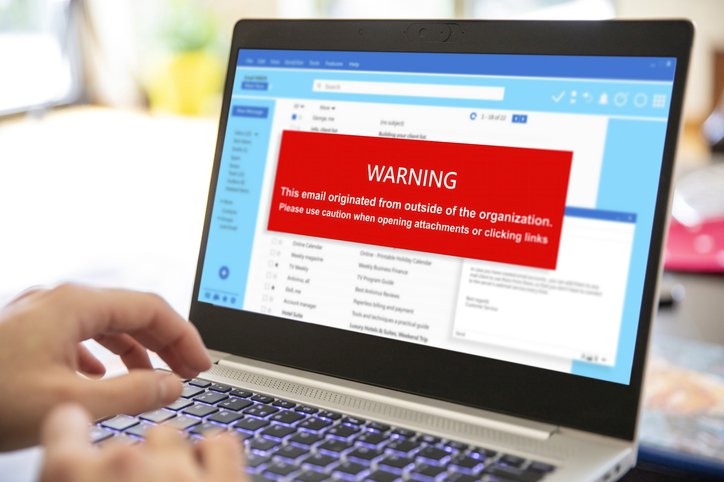
Pillay says if you have ever received an email from the South African Revenue Service (SARS), any one of the major banking institutions, a courier company or the Post Office saying you have a package, it will most likely include a link which the sender hopes you will click.
"Clicking this will take you to a site that looks identical to the company you are familiar with. You then proceed to follow the instructions and possibly download some software onto your device that was meant to enable a function or update that was required. You have now been infected with the malware," Pillay says.
Read more: Carol Ofori speaks to cybersecurity expert about Shashi Naidoo robbery
2. Social Engineering
What is social engineering?
Social engineering in the context of cybersecurity refers to the use of psychological manipulation to deceive online users into sharing their personal information or performing actions that compromise their security.
Pillay says: "This involves getting a user to believe that you are from a legitimate organisation or your IT department that requires information to assist you further, or part with sensitive information."
He shares some examples of what he has seen recently.
"You are looking for help to invest in Crypto, which you know is booming, but you know nothing about. So, you go online looking for companies, and you find a few. You visit the relevant sites and sign up. They have their agent call you and tell you the wonderful returns you can get by investing with them. They take further information from you (to be used later by their 'various departments'). Another agent then calls you, advising that if you act now, you will 10 times your money in a month," Pillay shares.
He adds: "This sounds inviting, so you deposit the required sum with LUNO (SA's local crypto exchange) and then have the crypto paid to the account they provided. You now believe that you have invested with them. A few months later, you get an email or a call advising that your investment has matured and to please click on the link they provided.
"This link will then take you to a page that usually displays the number of Bitcoins in your wallet. The value will make anyone dizzy, as I have seen this value range from 1.5 Bitcoins (approximately R2.92 million) to 5 Bitcoins (approximately R9.75 million). They then ask you to deposit an exchange transfer fee, usually around R3,000 to R5,000, which will transfer the funds to you in rand. From this point, you never hear from them again. So in this cyber scam, you had been robbed not once, but twice."

3. What malware and ransomware attacks are used for
Pillay says scammers get harmful software onto your device, for purposes of spying on you, to obtain information like:
- Login details, usernames/passwords
- Common passwords that you use across multiple platforms and sites
- Family history and clues as recovery password attempts
- To use your pc as a launchpad – meaning that your machine becomes a future tool for hacking activity that they will carry out against other people/companies, etc, all whilst shielding their identity.
- Ransomware – this type of malware affects the users most, as it holds the user hostage to the demands of the hacker.
- Ransomware encrypts users' data (documents/photos, all types of user files), once done, it displays a message that the user's information is encrypted.
How to protect yourself from malware and ransomware attacks
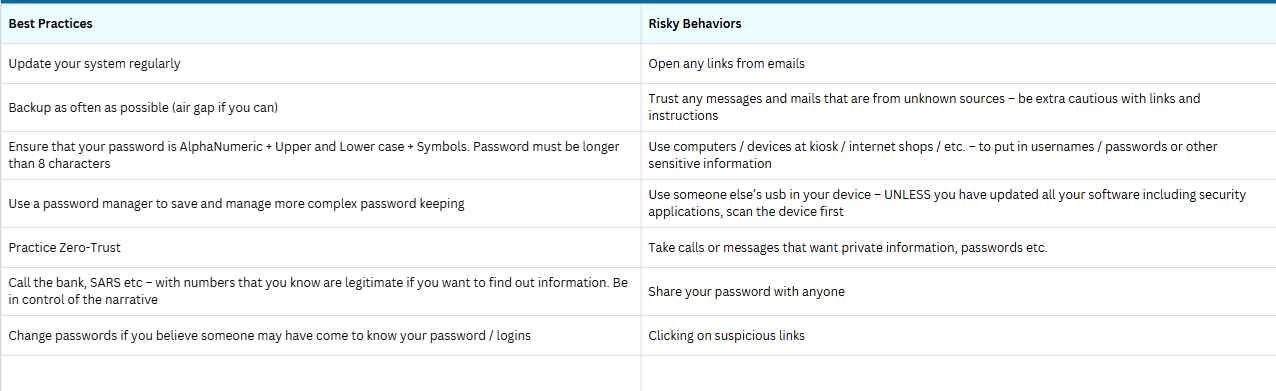
Pillay says there are several ways to keep yourself safe from cybersecurity threats.
1. Back up, Back up, Back up
"Backup is key. You should strive to make a backup of your files as often as possible. For convenience, a Network Addressed Storage (NAS) device works wonders as it removes the painful task of constantly plugging in a drive to back up," he says.
- A NAS device, with the correct setup and software, should take care of daily backups effortlessly. AIR – GAP where possible.
- An AIR-GAP backup is a backup that is NOT connected to any network. It is a backup that was taken, then kept in a safe place. This is particularly important for the most sensitive files of home users.
- Cloud storage. Most providers do offer some cloud storage capacity. This usually is about 1TB on most platforms. Utilise this option whenever possible to ensure you always have a backup copy of your data.
2. Ensure your device is using the latest updates
Software bugs, viruses, trojans, and malware rely on a weakness inherent in a particular system. By ensuring your device is up to date, you allow the provider of the operating system (OS) to address and patch any known vulnerabilities.
Most of these Operating System updates are free:
- Microsoft Windows: You could run into compatibility issues for End of Life (EOL) products, like printers, cameras, scanners, etc. that are no longer supported in later versions of Operating Software. Try to get a reputable company to assist and advise.
- Windows 10 EOL. Microsoft ceased support for Windows 10 on 14 October. This means that they will no longer provide security updates and patches for any issues or bugs that may be found in the future. However, there is HOPE for those whose backs are against the wall. Where their hardware does not allow or support an upgrade to Windows 11.
- Extended Security Updates. If you go to the Windows Update on your Windows 10 setup, you should find an Enrol Now – (enrol in extended updates). This should now give you an additional 12 months to get sorted out. Ensure that your Windows 11 is running update 25H2, which is the latest major update for the Windows 11 environment.
- Apple Mac. Apple Mac products are inherently safer, from a security perspective, due to being built on a Unix platform. Ensure that you are using the correct update for your product. An incorrect update can render your Mac product unusable, and you will then require technical help to restore it to a usable state. Research potential compatibility issues that may arise with a possible update. Common issues include Email issues and third-party devices not functioning correctly, which will require professional help to resolve.
- Linux, 1. These systems are typically used by the more technically prowess users and are usually updated and secured, as security is a fundamental cornerstone of a Linux-built system. Seek professional help if you want to go down this route, and you do not possess the skill to ensure a secure environment.
For more information on cybersecurity or IT needs, you can contact Matnet Technologies on 0861 628 638 [email protected]

HOW TO LISTEN TO EAST COAST RADIO
- Listen to East Coast Radio on the FM (frequency modulation) spectrum between 94 and 95 FM on your radio.
- Listen live to ECR by clicking here or download the ECR App (iOS/Android).
- Listen to East Coast Radio on the DStv audio bouquet, channel 836.
- Switch to the audio bouquet on your Openview decoder and browse to channel 606
- Listen to us on Amazon Alexa.
Follow us on social media:
Image Courtesy of iStock